What Is Restaurant Operations Software?
Restaurant operations software is the system that turns the daily work of running a restaurant, opening and closing routines, food-safety checks, prep, shift handoffs, and training, into assigned tasks with an owner, a deadline, and a record of what actually happened. Instead of a laminated sheet on the wall and a text thread when something goes wrong, a manager assigns the work, staff complete it on a phone, and a dashboard shows who did what and when across every shift.
Good systems cover three kinds of work. Rhythm work repeats on a clock: walk-in and reach-in checks, sanitizer tests, register counts, line readiness before the doors open. Production work follows the food: prep tied to par levels, batch pulls timed to service, handoffs between stations so nothing gets started twice or missed once. Leadership work is the one most tools skip entirely: turning a pre-shift briefing or a manager's walk-through into a task someone owns, instead of a note that dies in a notebook.
What separates real operations software from a digital binder is what happens when something is missed. A serious system flags a skipped critical check, routes it to a manager, and keeps the record. A digitized binder just moves the blank box from paper to a screen. The test is simple: does a missed task create a follow-up, or does it just disappear at midnight the way the paper version did?
The reason this category exists at all is that the work doesn't hold itself together on its own, and regulation moves under you too. Sesame became the FDA's ninth legally recognized major food allergen on January 1, 2023, which meant every allergen matrix, every recipe card, and every server script needed the same update on the same day. A shared drive doesn't push that change; someone has to remember to open forty files. A system built to hold that information in one place pushes it once.
How Do You Digitize Restaurant Checklists?
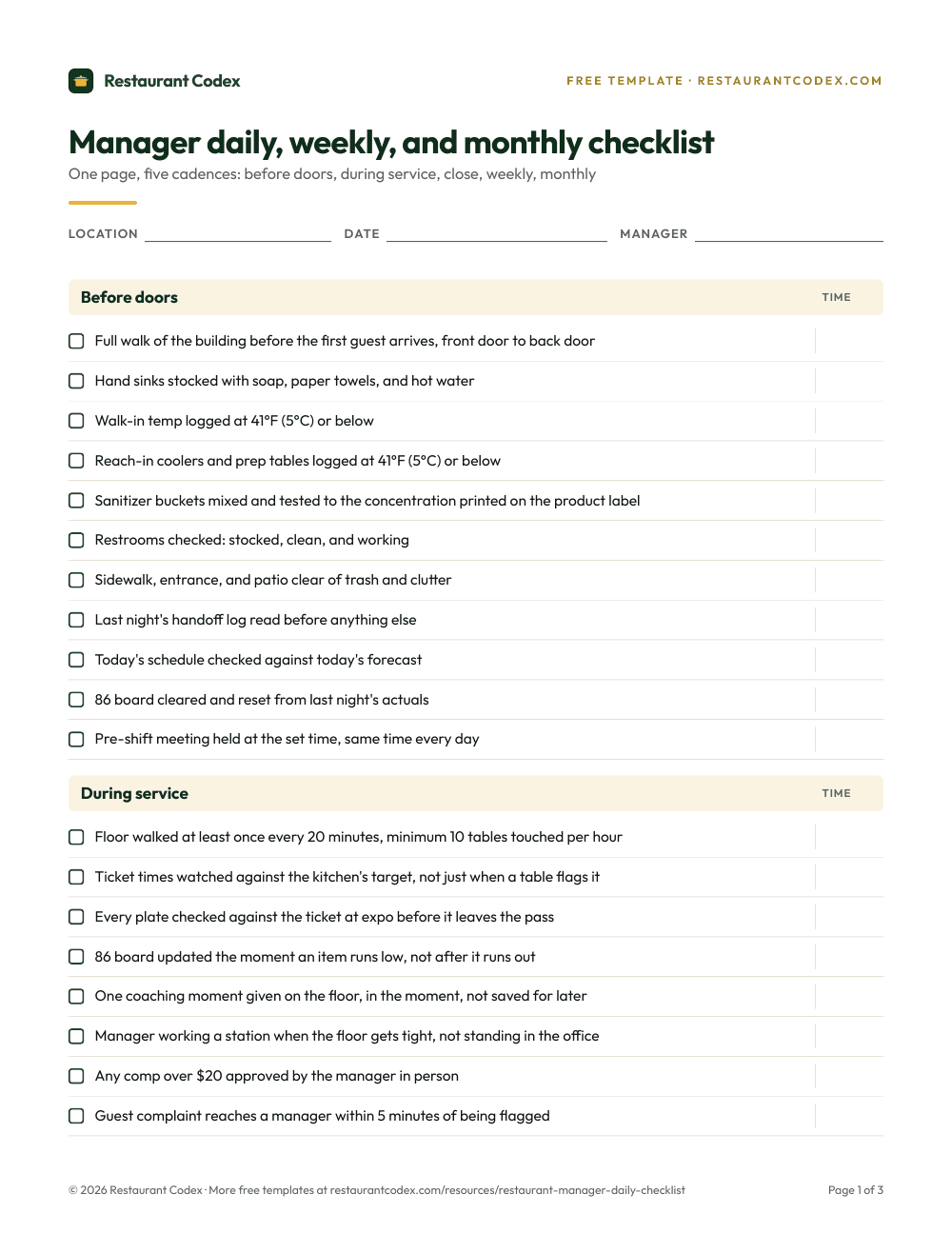
Digitizing a checklist means rebuilding each line as a task with a role, a schedule, and a clear definition of done, not scanning the laminated sheet into a PDF and calling it software. Paper fails in three specific ways that everyone quietly tolerates: ticks filled in after the fact from memory, pages that get lost or ruined, and no clear owner when a check gets missed during a rush. Digitizing on purpose fixes those three things directly, or it isn't really digitizing.
Start with the highest-risk items, not the whole clipboard. Pick the three or four controls you actually miss when it's slammed: walk-in temps, sanitizer buckets, cooling logs, a fryer filtration step, a restroom check during a Friday rush. Run those for two weeks with a manager reviewing completion every day, not once a month. Expand to the rest of the shift only once that review habit and the photo-proof pattern feel normal instead of forced.
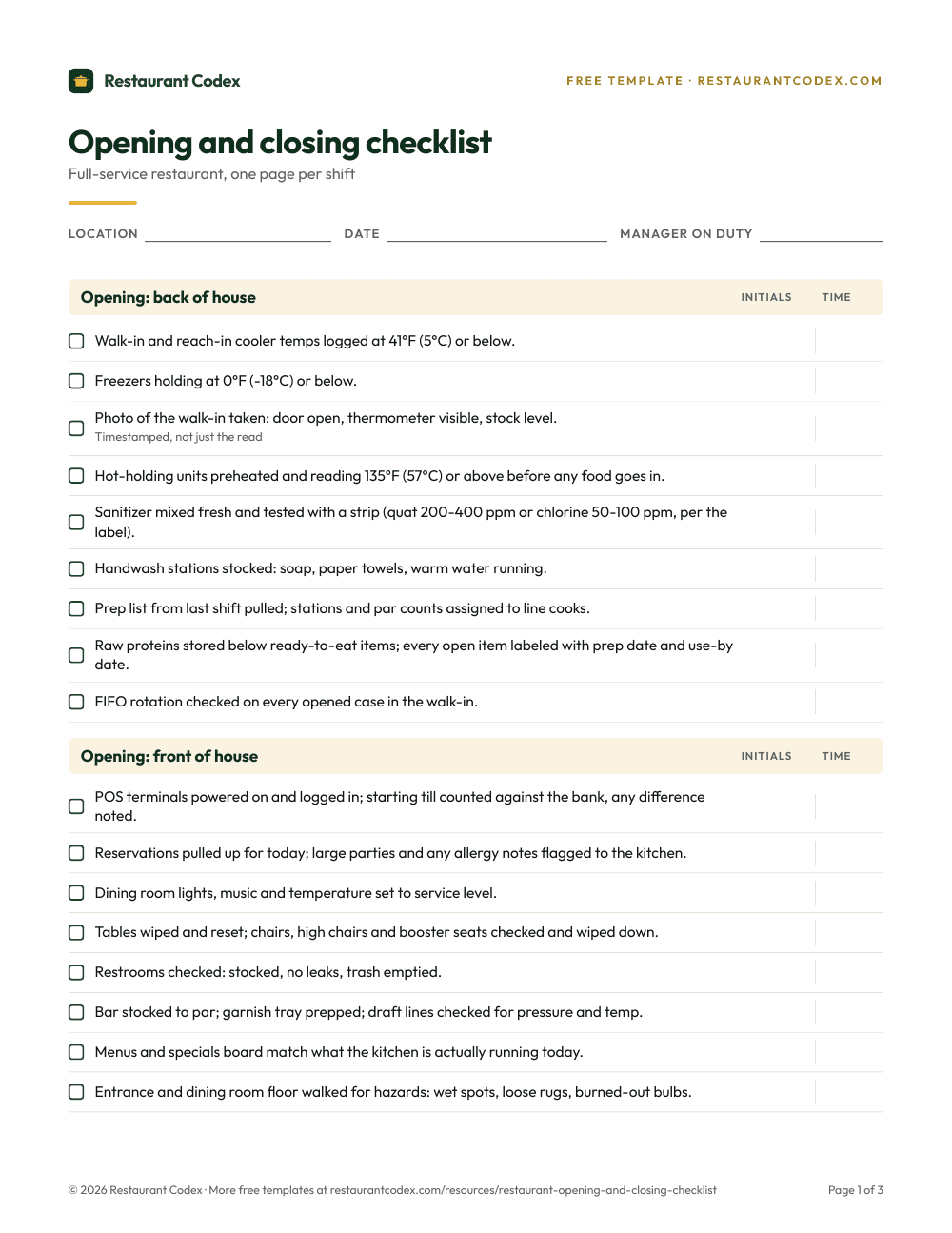
Write for a phone in someone's hand, in gloves, under a hood light. Short verbs, one action per line, a task list a person can actually finish, not a wish list dressed up as a checklist. Twenty to twenty-five critical items per role per checkpoint is a reasonable ceiling; past that, staff start batch-checking boxes without reading them, which is worse than paper because now it looks verified.
Paper Checklists vs. Restaurant Task Apps: Which One Wins?
Paper wins on cost and nothing else: it's free to print and impossible to trend. It fails the same three ways at every restaurant that uses it, ticks filled in from memory after the rush, pages that go missing or get soaked, and no record of who saw a problem and did nothing about it. A task app only wins if someone actually opens the dashboard afterward; buy the software and skip the weekly review, and you've paid for a slower clipboard.
| Paper checklist | Task app | |
|---|---|---|
| Cost to start | Free to print | Monthly per-user cost |
| Proof of completion | None past a checkmark | Timestamp, often a photo |
| What happens on a miss | Nothing, until someone notices | Alert to a manager, logged |
| Trend across weeks | Manual, rarely done | Built into the dashboard |
| Comparing locations | Not possible | One view across every store |
| Inspector or auditor export | Binder, if it survived | Filtered export in minutes |
The real failure mode isn't paper versus software, it's the hybrid: printing tasks out of the software so staff can check boxes offline, then entering them back in later. That defeats the entire point and takes more work than either format alone. Keep paper for genuine edge cases, like a grease-render log some local jurisdictions still require as a physical book, and put everything else where a manager can actually see it change over a week, not just a shift.
What Is the Best Restaurant Operations Software?
There's no universal best; the best system is the one your managers will actually open every week and your staff can finish on a phone without fighting the login. Start from the outcome you need, not the feature list: fewer missed temperature checks, faster time to a new hire's first solo shift, less variance between two stores running the same checklist, fewer overdue training modules.
A worked example: a seven-unit group ran a two-week pilot in its busiest store before signing anything. They didn't test every feature. They tested one opening checklist, one closing checklist, two food-safety controls, and a single training module, with the GM reviewing the dashboard each morning. Two things surfaced that no demo would have shown: the app ran slow on the store's oldest tablets during a Friday rush, and half the team skipped the photo step until a manager started asking for it by name every morning. Both were fixable, but only because they piloted somewhere real instead of watching a demo with perfect WiFi and a calm presenter.
Judge integration, not just single sign-on. Training that references an SOP staff can't find in thirty seconds is wasted training. A task list that ignores this week's actual recipe changes teaches people to ignore the task list. If tasks, a knowledge base, and training live in three different logins, someone on your team becomes the human glue holding them together, and that person eventually leaves.
That's the case for evaluating operations, a knowledge base, and an LMS as one connected system instead of three separate purchases: a spec that changes in one place should show up automatically everywhere it's used.
How Should You Price and Evaluate Operations Software?
Price operations software against the hours and mistakes it prevents, not the number on the invoice. Full-service prime cost, food cost plus labor, should run 60% to 65% of revenue, and quick-service closer to 55% to 60%, per Restaurant365's commonly cited benchmark; food cost alone should land between 28% and 35%, averaging 32.4% at full-service restaurants in 2026 per National Restaurant Association data. Those ranges matter here because 42% of restaurant operators said their business was not profitable last year, per the same National Restaurant Association report, which means the hours a manager spends chasing proof after the fact, or the fee that comes with a repeat violation triggering a re-inspection, aren't a rounding error against a margin that thin.
Build a rough model even if it's imperfect: hours a manager spends each week hunting for proof a task got done, hours a trainer spends repeating the same onboarding lecture because there's no recorded version, days added to a new hire's ramp to a solo shift, and the dollar cost of one repeat health-code violation. One prevented repeat inspection, or one private event that didn't fall through because a manager could produce a cleaning record on request, often pays for a year of a real operations system on its own.
Read the pricing model as closely as the feature list. Per-seat pricing that quietly excludes hourly staff pushes everyone back to a shared login or a paper workaround for exactly the people doing the work. Per-location fees punish a group for opening its next store. And count the cost of stitching three separate tools together with a part-time integration person or a pile of brittle automations; that's a real, recurring cost that never shows up on a vendor's pricing page.
What Changes Once You Run More Than One Location
Once you run more than one restaurant, the question stops being "did we do the checklist" and becomes "which store is drifting from the others." That question only has an answer if every store runs the same checklist, logged the same way, in one system a district manager or ops director can actually see without visiting in person.
Headquarters standardizes the definitions: what the checklist actually contains, what counts as a completed task, the escalation path when something's missed, and the training modules every new hire completes before a solo shift. None of that should vary by store; the moment it does, one store's "98% complete" stops meaning the same thing as another's.
The GM owns everything under those definitions: the schedule that gets the checklist done on time, which vendor gets the call when a cost line drifts, the corrective action when a cooler fails a temp check. A regional team that rewrites a GM's fix for them is running the store by remote control, and that doesn't scale past a handful of locations before headquarters becomes the bottleneck.
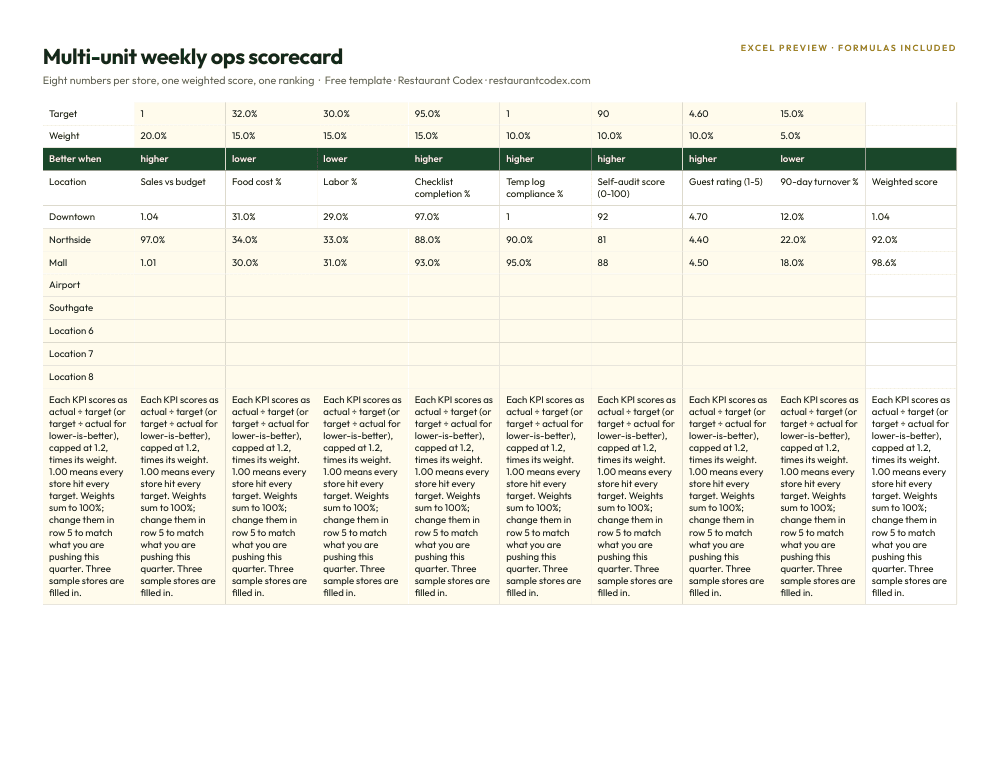
What changes as you add stores is where attention goes. With one restaurant, a manager notices a slipping standard because they're standing in it every day. At ten, the only way to notice is a dashboard that ranks stores against each other and flags the one quietly drifting before a health inspector, a guest review, or a bad month forces the conversation. That's the argument for operations software that rolls every location into one view instead of ten separate clipboards nobody's comparing.
Where Operations Software Rollouts Go Wrong
The most common mistake is buying software to fix a habit instead of fixing the habit. A team that backfills paper checklists from memory will backfill digital ones the same way if nobody changes what happens after a miss; the software just makes the dishonesty faster to enter and easier to audit later, which is at least an improvement, but it isn't the fix people think they bought.
The second mistake is rolling out everything at once. A twenty-location group that turns on every checklist, every module, and every log in the same week earns a wave of support tickets, a confused staff, and a manager who stops opening the dashboard because there's too much in it to review. Rushing the rollout also hides the third mistake until it's expensive: nobody connects the systems to each other. A prep list that ignores what's in the waste log keeps over-ordering the same ingredient. Food retail, food service, and household waste combined totaled 66 million tons in the U.S. in 2019, with about 60% of it landfilled, according to EPA data, and a slice of a restaurant's share of that is simply prep that never matched what actually sold.
The fourth mistake is treating a missed task as a training problem before checking whether it's a staffing or a design problem. If the same line item gets missed at 7pm every Friday, the fix might not be another reminder. It might be that the checklist has more steps than the number of people on the floor at that hour can absorb. Software makes that pattern visible for the first time; it still takes a manager willing to read it as a signal instead of a scorecard to argue about.
Where Restaurant Codex Fits
Restaurant Codex builds operations this way on purpose: staff complete tasks on a phone, managers read one dashboard instead of stitching together three, and the history is there when you need it for coaching or for an inspector. Tasks sit next to the knowledge base that documents the standard behind them and the LMS that trained someone on it in the first place, so a changed recipe or a new allergen rule updates one place instead of four.
Restaurant groups running on Restaurant Codex include Mercado 24 in Guatemala City, Koli Cocina de Origen in Monterrey, and Tapiz Bistro & Bakery in Mexico City, across concepts from fine dining to a neighborhood bistro and bakery. For how this category compares to the rest of a restaurant's tech stack, see what software restaurants actually use.
Restaurant Codex
The same checklist, on every phone, with photo proof
Restaurant Codex runs this template as a live task with timestamps, photos and one view across every location. Bring it to a 30-minute working session and we'll show you how it would run across your locations.
By the Restaurant Codex team
Written with operators who run multi-location restaurant groups. Reviewed against the FDA Food Code and the sources listed below.
Sources
- FDA, FASTER Act: Sesame as the 9th Major Food Allergen
- EPA, Food: Material-Specific Data (wasted food, 2019)
- National Restaurant Association, 2026 State of the Industry press release
- BLS, Job Openings and Labor Turnover Survey, Table 4 (quits rate)
- FRED (BLS), Total Separations Rate, Accommodation and Food Services (JTS7200TSR)
- WhippleWood, Financial Benchmarks for Restaurants (NRA 2026 data)
- Restaurant365, How to Calculate Prime Cost in a Restaurant